Microsoft 365 Outage, Zero-Days and the FAA Ground Stop: Lessons for Canadian Businesses
By Umer Khalid, President · Published · 12 min read
If you spent last Thursday afternoon refreshing Outlook, waiting on a Teams meeting invite that never showed up, or wondering whether a client ever got your email, you weren't alone. And if you had staff, customers or shipments heading to the U.S. on Friday, you probably had a second headache.
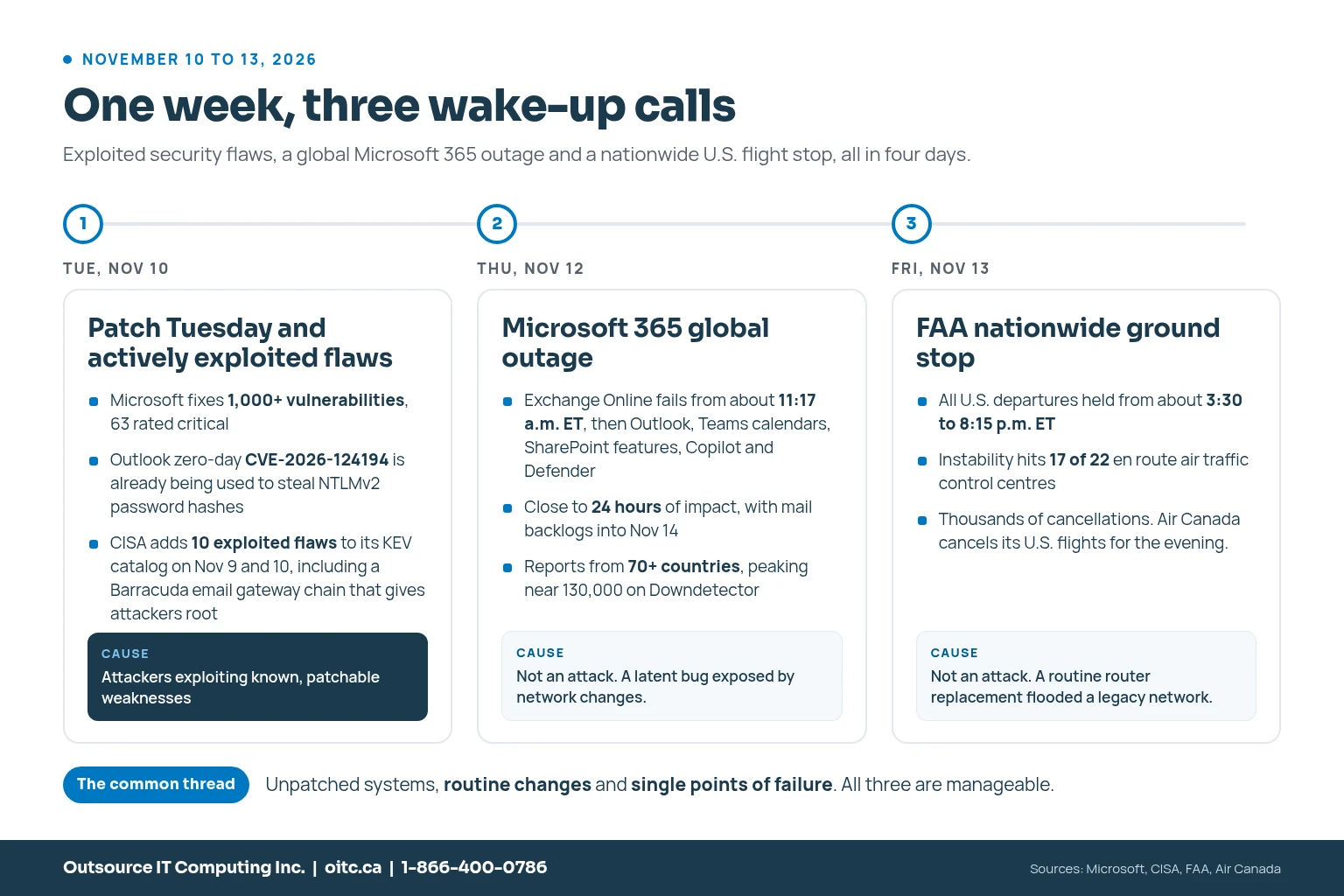
Last week packed three very different IT failures into four days. On Tuesday, Microsoft patched more than 1,000 vulnerabilities, including an Outlook zero-day that attackers were already using. On Thursday, Microsoft 365 went down around the world for close to a full day. On Friday, the FAA held every departing flight in the United States after its air traffic communications network became unstable.
None of these started inside your business. Every one of them still landed on businesses like yours. So I want to walk through what actually happened, what it means for Canadian small and mid-sized businesses that run on Microsoft 365, and what a good managed IT services provider does about it. No panic, just the practical stuff.
The short answer
- Patch Tuesday (November 10): Microsoft fixed more than 1,000 flaws. One of them, an Outlook bug tracked as CVE-2026-124194, was already being exploited to steal password hashes. CISA also flagged an actively exploited Barracuda Email Security Gateway attack chain.
- Microsoft 365 outage (November 12 to 13): Exchange Online, Outlook, Teams calendars, Copilot and other services were disrupted for close to 24 hours. Microsoft says it wasn't a cyberattack. A hidden bug was exposed by network changes.
- FAA ground stop (November 13): U.S. departures were halted for nearly five hours after a routine router replacement flooded a legacy telecom network. Again, not a cyberattack.
- The lesson: unpatched systems, risky routine changes and single points of failure cause most bad days in IT. You can manage all three with risk-based patch management, change control, a real business continuity plan and 24/7 monitoring.
What happened on Patch Tuesday, and why does the Outlook zero-day matter?
Microsoft's November 10 Patch Tuesday was huge again: more than 1,000 vulnerabilities fixed, with 63 rated critical. It's the second month in a row over the 1,000 mark. Most of those bugs will never be used against a small business. One already was.
CVE-2026-124194 is an Outlook spoofing flaw. If someone opens a specially crafted message file, Outlook can connect to a server the attacker controls without showing the usual external content warning. Along the way, Windows can hand over the user's NTLMv2 authentication hash. An attacker can then try to crack that hash offline, or relay it to sign in somewhere else as that person.
Microsoft rated it only "Moderate." Don't let that fool you. Microsoft confirmed attackers were already using it, and CISA added it to its Known Exploited Vulnerabilities (KEV) catalog the same day. It affects Microsoft 365 Apps for Enterprise and Office LTSC 2021 and 2024, which means this is an Office update, not just a Windows one. That's exactly the kind of patch that gets missed.
It wasn't the only exploited flaw that week. Across November 9 and 10, CISA added ten actively exploited vulnerabilities to the KEV catalog. Two of them were Barracuda Email Security Gateway bugs (CVE-2026-116606 and CVE-2026-111560) that attackers were chaining together to get root access on the appliance that filters a company's email. Barracuda released fixes on November 2. About a week later, it confirmed attacks against a small number of organizations.
That gap between "patch available" and "patch installed" is where most businesses get hurt.
What caused the Microsoft 365 outage?
On Thursday, November 12, Exchange Online mailbox access started failing at about 11:17 a.m. Eastern. By early afternoon it was a widespread incident. Outlook, Teams calendars and scheduling, SharePoint features that rely on Exchange, Microsoft 365 Copilot and Defender XDR were all affected. Reports came in from more than 70 countries.
Microsoft's explanation shifted a few times during the incident, which is normal when engineers are still digging. The picture it has given since: a problem left behind by an earlier network capacity upgrade was exposed by a later network change, and it hit the systems that set up secure connections. Requests piled up until servers ran out of capacity and failed their health checks. When engineers brought servers back, the waiting traffic overwhelmed them again, which is why recovery dragged on. Microsoft said there was no sign of malicious activity.
By Microsoft's own incident record, the impact ran close to 24 hours, with delayed email still working its way through into November 14. A full post-incident report was still pending when I wrote this.
Here's the part that matters for you: you can't prevent a Microsoft outage. You can only decide, in advance, what your business does during one.
Why did the FAA ground every flight in the U.S.?
On Friday, November 13, at about 3:30 p.m. Eastern, the FAA issued a nationwide ground stop. Air traffic resumed around 8:15 p.m. once the system was stable. It was only the second nationwide ground stop in the U.S. since 9/11.
The FAA's explanation is worth reading if you're responsible for any kind of network. Data started flooding its legacy telecommunications network at roughly 1,000 connection attempts every four to five seconds. The FAA traced it to two remote sites, one of which had just had a new router installed as part of routine replacement work. Instability spread to 17 of 22 en route air traffic control centres. Some radio frequencies and radar feeds kept working, so it wasn't a total blackout, but departures were stopped as a precaution. The network provider blocked the two sites, the FAA disabled the problem feature on the new routers and about 60 similar ones, and things settled down.
The FAA also said it will rethink when it does this kind of work, since this router swap happened during the day instead of overnight. U.S. officials said there was no indication of a cyberattack, and no connection to the Microsoft outage.
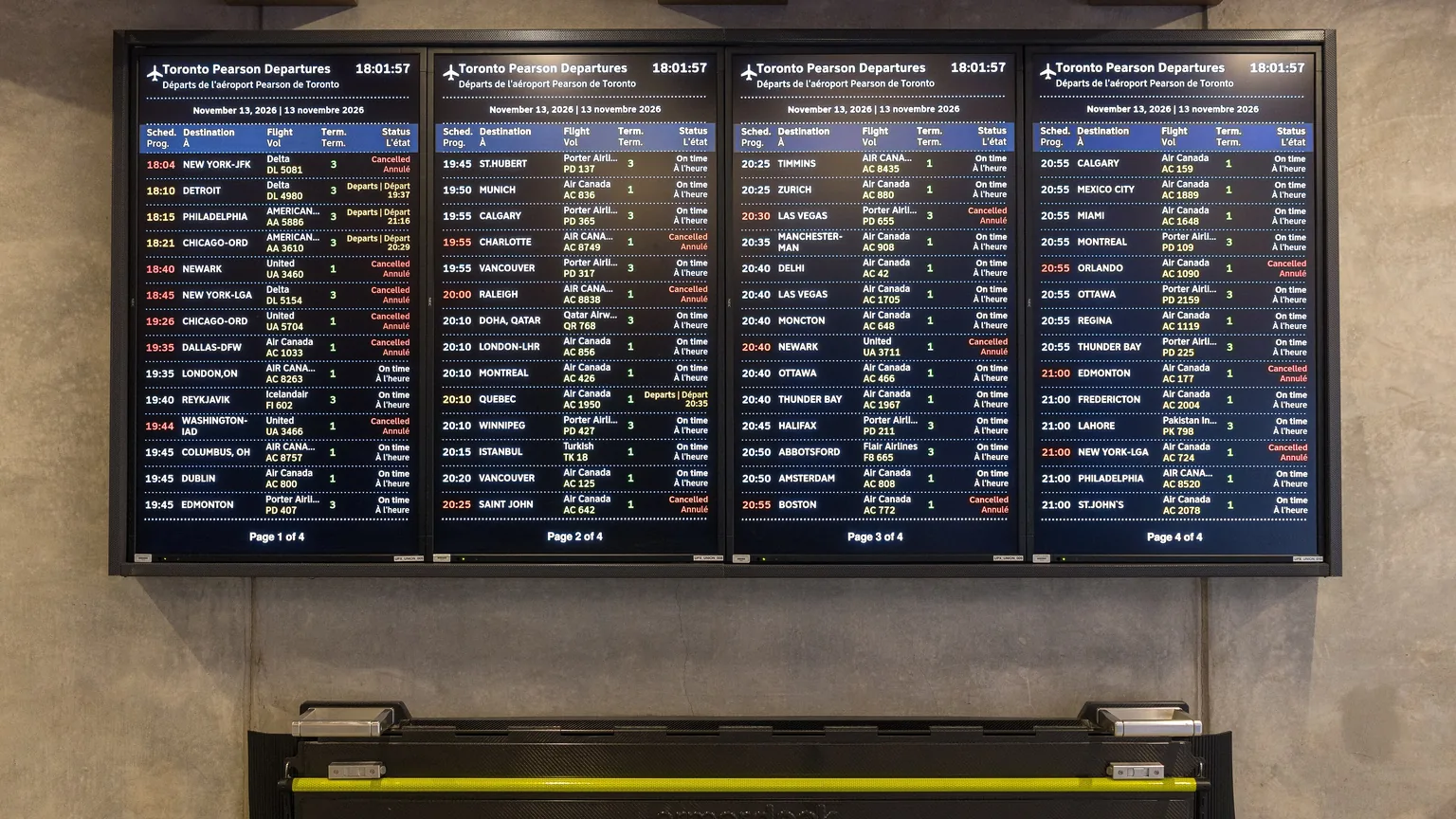
Canada felt it right away. NAV CANADA said its own systems were operating normally, but Air Canada cancelled its flights to and from the U.S. for the rest of the evening, and airports across the country suspended U.S. service. If you run a Canadian business with cross-border clients, suppliers or transportation and logistics operations, a failure in someone else's network became your problem on a Friday night.
The four gaps behind the headlines
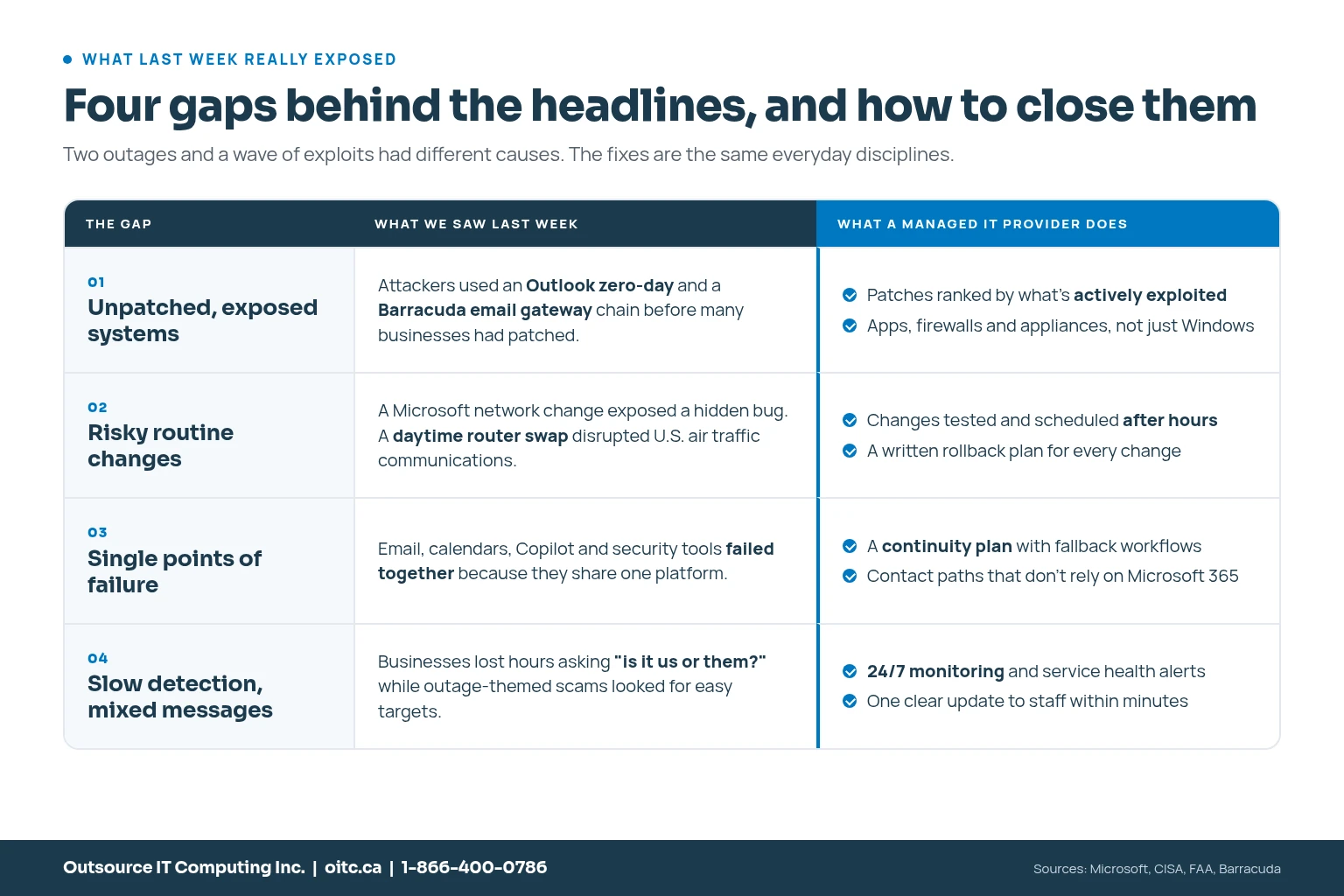
Different organizations, different causes. But when I put these three events side by side, I see the same four gaps I see when a business calls us after a bad day.
1. Unpatched, exposed systems
Attackers don't need a new trick when an old one still works. The Outlook and Barracuda attacks went after flaws that already had fixes. The answer isn't patching everything the second it's released. It's patching in the right order:
- Actively exploited flaws first. Anything on the CISA KEV list or flagged by the Canadian Centre for Cyber Security should be installed within days.
- Internet-facing systems next. Firewalls, VPNs, email gateways and remote access tools are your front door.
- Identity and email. Outlook, Exchange and anything tied to how people sign in.
- Everything else on a steady monthly cycle, with reports that show what actually got installed, not what was supposed to.
Notice that an appliance like the Barracuda gateway isn't covered by Windows Update. A real patch management program includes third-party apps, firewalls and network gear too. That's a big part of our endpoint management and cybersecurity and threat protection work.
2. Risky routine changes
Both outages started with ordinary maintenance. Microsoft's network changes exposed a hidden bug. The FAA's daytime router swap flooded a fragile network. Nobody was being reckless, and that's the point: routine changes are where routine risk lives.
Good change management is boring on purpose. Test first. Schedule after hours. Change one thing at a time. Write down how you'll roll it back before you start. And make sure someone is watching who can undo it in minutes, not hours.
3. Single points of failure
Thursday's outage didn't just take out email. It hit calendars, Copilot and security tools at the same time, because they all lean on the same platform. I still recommend Microsoft 365 to almost every client. But concentration risk is real, and it's your risk to plan for, not Microsoft's.
You don't need a second email system. You need a plan for when the first one is gone:
- A way to reach staff that doesn't run through Microsoft 365, like a text group or a phone tree
- An up-to-date contact list for key clients and suppliers, stored somewhere else
- Independent Microsoft 365 backup, because Microsoft's job is keeping the service running, not restoring your deleted data
- A short list of who decides what, and when, during an outage
Our business continuity and disaster recovery service is built around exactly this kind of planning.
4. Slow detection and mixed messages
On Thursday, a lot of businesses lost the first hour just figuring out whether the problem was on their end or Microsoft's. Meanwhile, outages are a gift to scammers. Fake "Microsoft support" calls and password reset emails show up fast when people are confused. The Canadian Centre for Cyber Security issued an alert on October 28 about an ongoing help desk voice phishing campaign targeting Canadian organizations, so this isn't hypothetical.
A managed IT provider with 24/7 monitoring watches your environment and Microsoft's service health at the same time. Within minutes you should know whether it's you or them, and your staff should get one clear message: what's down, what still works, and don't trust any IT call you didn't ask for.
Your first 60 minutes when Microsoft 365 goes down
Here's the playbook I'd want every business on Microsoft 365 to have printed out. Not saved in SharePoint. Printed.
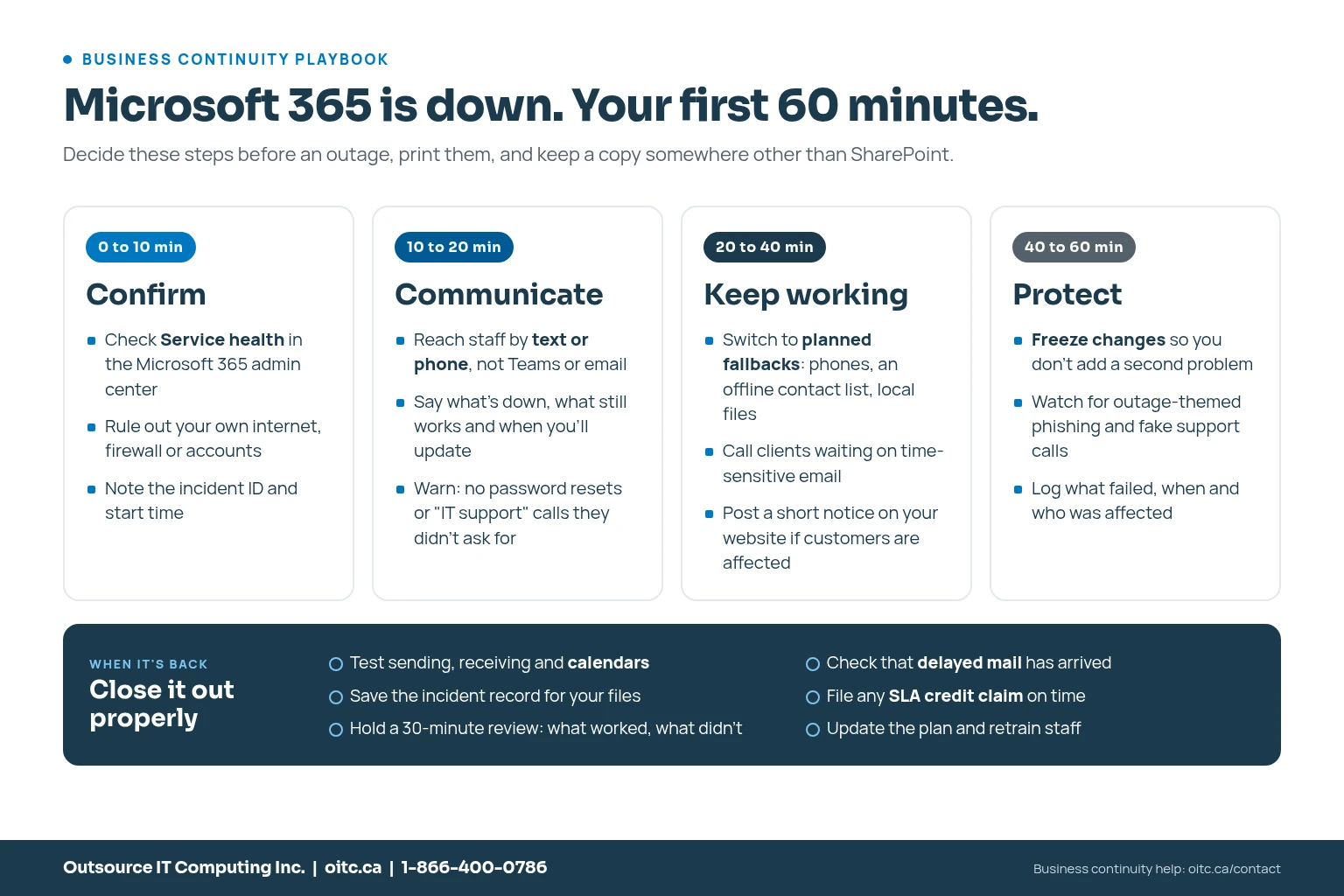
The most important step is the one most people skip: deciding all of this before it happens. In the middle of an outage, nobody has time to work out who calls the clients.
Can your business get a credit for the Microsoft 365 outage?
Possibly, but it won't happen automatically. Microsoft's service level agreement promises 99.9% monthly uptime for Exchange Online. If uptime falls below that, you can claim a credit of 25% of that service's monthly fee, rising to 50% below 99% and 100% below 95%. Claims for November incidents have to reach Microsoft by the end of December 2026.
- Gather the details now: the incident IDs (EX1550543 and MO1550821 for this one), when your users were affected, how long, how many people and what errors they saw.
- Check who files: if you buy Microsoft 365 through a partner, the partner usually submits the claim for you. Ask them this week.
- Be realistic: a credit is a discount on a future bill. It won't come close to covering a day of lost productivity, which is why continuity planning matters more than the claim.
If you'd like help pulling the details together, our Microsoft 365 team is happy to help.
What this means for Canadian businesses
It's easy to read these as American stories. They aren't. Canadian businesses run on the same Microsoft 365 platform, use the same Outlook builds and buy the same email security appliances. And the numbers say Canadian firms are already dealing with the fallout.
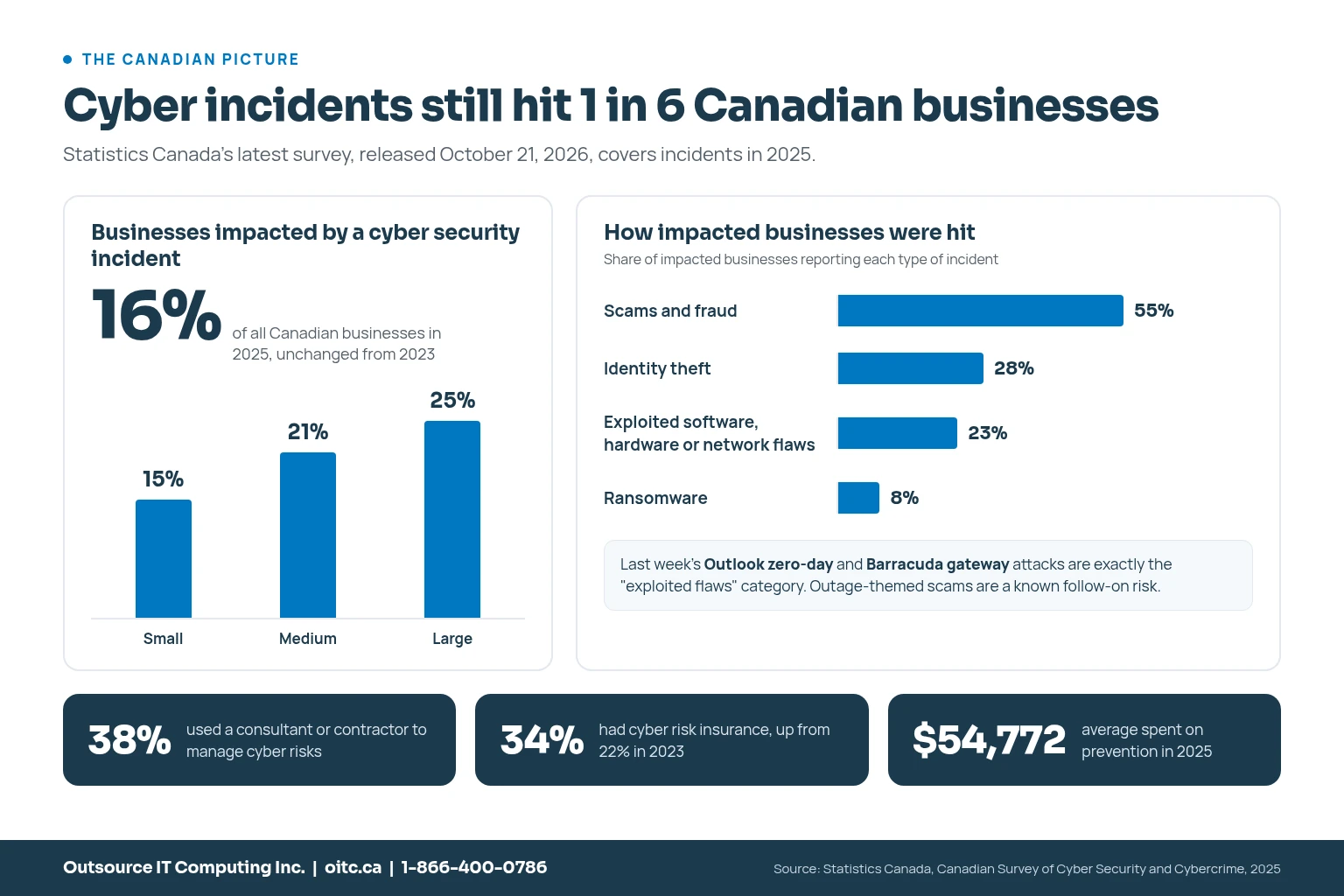
Statistics Canada's latest Canadian Survey of Cyber Security and Cybercrime, released October 21, found that about one in six Canadian businesses (16%) were impacted by a cyber security incident in 2025. That includes 15% of small businesses and 21% of medium-sized ones. Among businesses that were hit, 23% reported the exploitation of software, hardware or network vulnerabilities, which is exactly what last week's Outlook and Barracuda attacks were. And 38% of businesses used a consultant or contractor to help manage cyber risks.
That last number tells me a lot of Canadian businesses already know they can't do all of this alone. The real question is whether the help they have is actually watching, patching and planning, or just answering tickets.
How a managed IT services provider helps
I'll be straight with you: no provider, including us, could have stopped Microsoft's outage or the FAA's. What a good managed IT services provider does is make sure events like these stay an inconvenience instead of turning into a crisis. For a Canadian small or mid-sized business, that looks like:
- 24/7 monitoring of your systems and your cloud services, so you hear about problems before your staff do
- Risk-based patch management that puts actively exploited flaws first and covers apps, firewalls and appliances, not just Windows
- Change control with testing, after-hours maintenance windows and rollback plans
- A written business continuity plan with fallback workflows and communication paths that don't depend on Microsoft 365
- Microsoft 365 backup and security settings, including the ones Microsoft leaves to you
- Employee cybersecurity training so people spot outage-themed phishing and fake support calls
- A Canadian team that picks up the phone when something big is happening
If you already have an internal IT person, you don't have to replace them. Co-managed IT gives them backup for monitoring, patching and the calls that come in at 2 a.m.
What to do this week
- Confirm the November Office and Windows updates are installed, especially on every computer that uses desktop Outlook.
- If you use a Barracuda Email Security Gateway, confirm Barracuda's November security updates are applied and that its admin interface isn't reachable from the internet.
- Ask your IT team or provider how they found out about Thursday's outage, and how fast.
- Write down how you'd reach every employee if email and Teams were both down.
- If your business was affected, gather your incident details and file a Microsoft SLA claim before December 31.
- Run our free downtime cost calculator to see what a day like last Thursday actually costs you.
Frequently asked questions
What caused the Microsoft 365 outage on November 12, 2026?
Microsoft says a problem left behind by an earlier network capacity upgrade was exposed by a later network change, affecting the systems that set up secure connections. Requests piled up until servers failed their health checks, and restored servers were overwhelmed again, which slowed recovery. Microsoft found no sign of malicious activity.
Was the Microsoft 365 outage a cyberattack?
No. Microsoft said there was no indication of malicious activity. U.S. officials also said the FAA ground stop the next day was not caused by a cyberattack and was not connected to the Microsoft outage.
How long did the Microsoft 365 outage last?
Problems started around 11:17 a.m. ET on November 12. Microsoft's incident record shows close to 24 hours of impact, with delayed email still being delivered into November 14.
What is CVE-2026-124194?
It's an actively exploited Microsoft Outlook spoofing vulnerability patched on November 10, 2026. A crafted message file can make Outlook connect to an attacker's server and leak the user's NTLMv2 password hash. Installing the November Office updates fixes it.
What caused the FAA nationwide ground stop?
The FAA says data flooded its legacy telecommunications network after a routine router replacement at a remote site, causing instability at 17 of 22 en route control centres. Departures were halted from about 3:30 p.m. to 8:15 p.m. ET on November 13. The FAA said there was no indication of a cyberattack.
Can my business get money back for the Microsoft 365 outage?
You may qualify for a service credit if Exchange Online uptime fell below 99.9% for the month. Credits are 25%, 50% or 100% of that service's monthly fee depending on how far uptime dropped. Claims for November must reach Microsoft by December 31, 2026, and they aren't applied automatically.
How can a small business prepare for a Microsoft 365 outage?
Write a short continuity plan that covers how you'll confirm the outage, reach staff without Microsoft 365, keep critical work moving and warn people about outage-themed scams. Add independent Microsoft 365 backup and 24/7 monitoring so you know quickly whether the problem is yours or Microsoft's.
How does a managed IT services provider help during a cloud outage?
A managed IT provider monitors your systems and Microsoft's service health around the clock, confirms the cause quickly, keeps your staff informed, switches on fallback plans, guards against scams during the confusion, and handles cleanup and SLA claims afterward.
A final thought
Last week was a good reminder that resilience isn't a product you buy. It's a set of habits: patch what's being exploited, respect routine changes, plan for the day your favourite platform disappears, and make sure someone is always watching. The businesses that got through last Thursday without much drama weren't lucky. They'd made those decisions ahead of time.
If you'd like a second opinion on where you stand, book a free IT health check, explore our managed IT services, contact our team, or call 1-866-400-0786.
Umer
Sources
- CSO Online: November 2026 Patch Tuesday, 63 critical fixes plus an Outlook zero-day (Nov 10, 2026)
- Qualys: Microsoft Patch Tuesday, November 2026 Security Update Review (Nov 10, 2026)
- CISA: Six Known Exploited Vulnerabilities added to catalog, including CVE-2026-124194 and Barracuda ESG (Nov 10, 2026)
- CISA: Four Known Exploited Vulnerabilities added to catalog (Nov 9, 2026)
- SecurityWeek: Recently patched Barracuda vulnerabilities exploited in attacks
- BleepingComputer: Massive Microsoft 365 outage disrupts Outlook, Teams, Copilot worldwide (Nov 12, 2026)
- BetaNews: Microsoft traces Microsoft 365 outage to an earlier network upgrade
- Digital Trends: Microsoft 365 outage resolved
- Inc.: Microsoft's Outlook outage could qualify your business for a credit
- Microsoft Learn: Service level agreement concepts
- FAA: Nationwide Ground Stop, Questions and Answers (Nov 15, 2026)
- KPTV: FAA issues nationwide ground stop for second time since 9/11
- CP24: Canadian airports warn more delays expected after U.S. FAA lifts ground stop
- Statistics Canada: Impact of cybercrime on Canadian businesses, 2025 (Oct 21, 2026)
- Canadian Centre for Cyber Security: Alerts and advisories
About the author
Umer Khalid, President
Written and reviewed by the Outsource IT team, a Burlington, Ontario managed IT services provider supporting businesses across the GTA for over 20 years. Meet the team.
Want this handled for you?
Outsource IT keeps Ontario businesses secure, supported and running. Book a short call, or score your current setup with our free IT Health Check.