
Best Managed IT Services for Law Firms Compared
By Jerry Aaron, Systems Administrator · Published · 10 min read

"Hi, it's IT. We're moving everyone to passkeys today. Can you sign in at this link so you don't get locked out?"
It sounds like a normal Tuesday. In October, calls just like that helped attackers get into staff accounts at several of Canada's largest law firms. Those firms have security teams. Most firms don't.
I'm a systems administrator at Outsource IT. My job is keeping law firm technology running: the document management system, the accounting software, the firewall nobody has looked at since the last office move. If you're a managing partner or office manager comparing managed IT services, here's how I'd judge your options. No jargon. Just what to look for, what to ask and what should make you walk away.
The short answer: what are the best managed IT services for law firms?
The best managed IT services for law firms do four things well:
- 24/7 IT monitoring with a real person who acts on alerts at 2 a.m., not an email that waits until morning.
- Managed cybersecurity services built around how law firms actually get hit: stolen sign-ins, fake IT calls and payment fraud.
- IT compliance support that produces proof you can hand to LawPRO, your cyber insurer or a client's security questionnaire.
- Service fit: people who already know your legal software, your closing days and your court deadlines, and who answer the phone in Canada.
For most small and mid-sized Canadian firms, that points to a managed IT provider with real legal experience, either fully managed or co-managed alongside your own IT person.
Why law firms need more than "someone who fixes computers"
Law firms hold three things criminals want: confidential files, personal information and trust account money. This year made that very clear.
- Fake IT calls. On October 28, the Canadian Centre for Cyber Security warned that callers were posing as internal IT staff and steering employees to fake sign-in pages, with October activity concentrated on the legal sector. Several large Canadian firms confirmed that staff accounts or parts of their Microsoft cloud environment were accessed.
- Trust account fraud. LawPRO has warned that a growing number of Ontario lawyers are seeing unauthorized wire transfers from their trust and general accounts.
- Insurance limits. LawPRO covers claims arising from social engineering fraud only to a $250,000 sublimit, unless the lawyer takes LawPRO's required steps to extend that coverage to the standard $1 million.
None of that gets fixed by a faster laptop. It gets fixed by how your technology is watched, secured and documented. That's what you're really buying when you buy managed IT.
How to compare managed IT services for a law firm
Every provider's website says the same things. Here are the four areas that actually separate them, in plain language, with the question to ask and the answer that should worry you.
1. 24/7 IT monitoring and network monitoring
Every provider says "24/7." Ask what that means at 2 a.m. on a Saturday.
Good monitoring watches what your firm can't work without: the firewall and internet connection, servers and backups, every laptop, Microsoft 365 sign-ins and your document management system. When something fails or looks wrong, a person gets the alert and acts on it.
Network monitoring matters more than most firms think. If the internet drops on a closing day and Teraview won't load, you want someone already working on it before your clerks start calling.
Ask: "What did you catch overnight last month, and what did you do about it?"
Red flag: "24/7 monitoring" that turns out to be an automated email someone reads the next morning.
2. Managed cybersecurity services
Antivirus and a spam filter aren't a security program anymore. For a law firm, I'd expect your provider to run at least these:
- Phishing-resistant multi-factor authentication (MFA), like passkeys or security keys, starting with partners, accounting staff and admins. The Cyber Centre recommended exactly this after the October attacks, because ordinary MFA codes can be passed along by a fake sign-in page.
- Sign-in rules that only let firm-managed devices into Microsoft 365, with alerts when someone adds a new MFA device or downloads hundreds of files.
- Endpoint detection and response on every laptop and server, watched by a security team around the clock.
- Email security that catches lookalike domains and "updated banking details" requests.
- A help desk that verifies callers before any password or MFA reset, plus one simple rule for your staff: if "IT" calls asking you to sign in, hang up and call back on a number you already know.
- Trust account safeguards on the IT side: a locked-down setup for online banking, and help putting dual approval and bank alerts on wires.
- Security awareness training built around real legal scams: fake closing funds instructions, fake opposing counsel and fake IT.
Ask: "Show me which of our users have phishing-resistant MFA today."
Red flag: security sold as a pile of add-ons on top of a basic help desk plan.
3. IT compliance support
Law firms answer to more people than most businesses: the Law Society, LawPRO, privacy law, cyber insurers and, more and more, clients who send security questionnaires before they hand over work. Here's what that looks like in plain terms:
- Law Society of Ontario: the commentary to the competence rule says lawyers should understand the benefits and risks of the technology they use, including how it affects client confidentiality.
- PIPEDA: if a breach creates a real risk of significant harm, you must report it to the Privacy Commissioner of Canada and notify the people affected. You must also keep a record of every breach, even small ones, for at least two years.
- Quebec's Law 25: stricter rules apply if you hold personal information about Quebec residents.
- LawPRO and cyber insurers: they want to see MFA, backups, training and payment verification steps actually in place.
Good IT compliance support means your provider keeps the evidence for you: who has access to what, patch reports, backup test results, a list of every device and a written incident response plan. When the questionnaire lands, you answer it in an afternoon, not a week.
Ask: "If we had a breach tonight, who calls who, and what records would we have?"
Red flag: "Compliance is your responsibility," with no help producing the evidence.
One note: I'm a systems administrator, not a lawyer. Confirm your specific obligations with the Law Society or your privacy counsel.
4. Service fit for a law practice
This is where generalist IT companies usually struggle. Law firms run on software most offices never touch: PCLaw, Clio, Teraview, The Conveyancer, DivorceMate and document management systems like iManage or Worldox. A provider who has never seen them will learn on your time.
Service fit also means:
- Knowing that a closing day or a filing deadline is not the day for a "quick update"
- Setting up new associates and summer students fast, and shutting off access the same day someone leaves
- Secure remote access for lawyers working from home, the courthouse or a client's office
- A Canadian team, with straight answers about where your data is stored
- Response times written into the agreement, and monthly reports that show whether they were met
Ask: "Which law firms do you support, and which of our applications do you already know?"
Bonus: proactive IT support, not just a help desk
The best providers fix problems before you notice them. That's proactive IT support: patching on a schedule, replacing aging hardware before it fails, testing backups by actually restoring files, and sitting down with you every quarter to plan ahead. If the only time you hear from your provider is when you open a ticket, that's reactive IT with a monthly fee.
Managed IT options for law firms compared
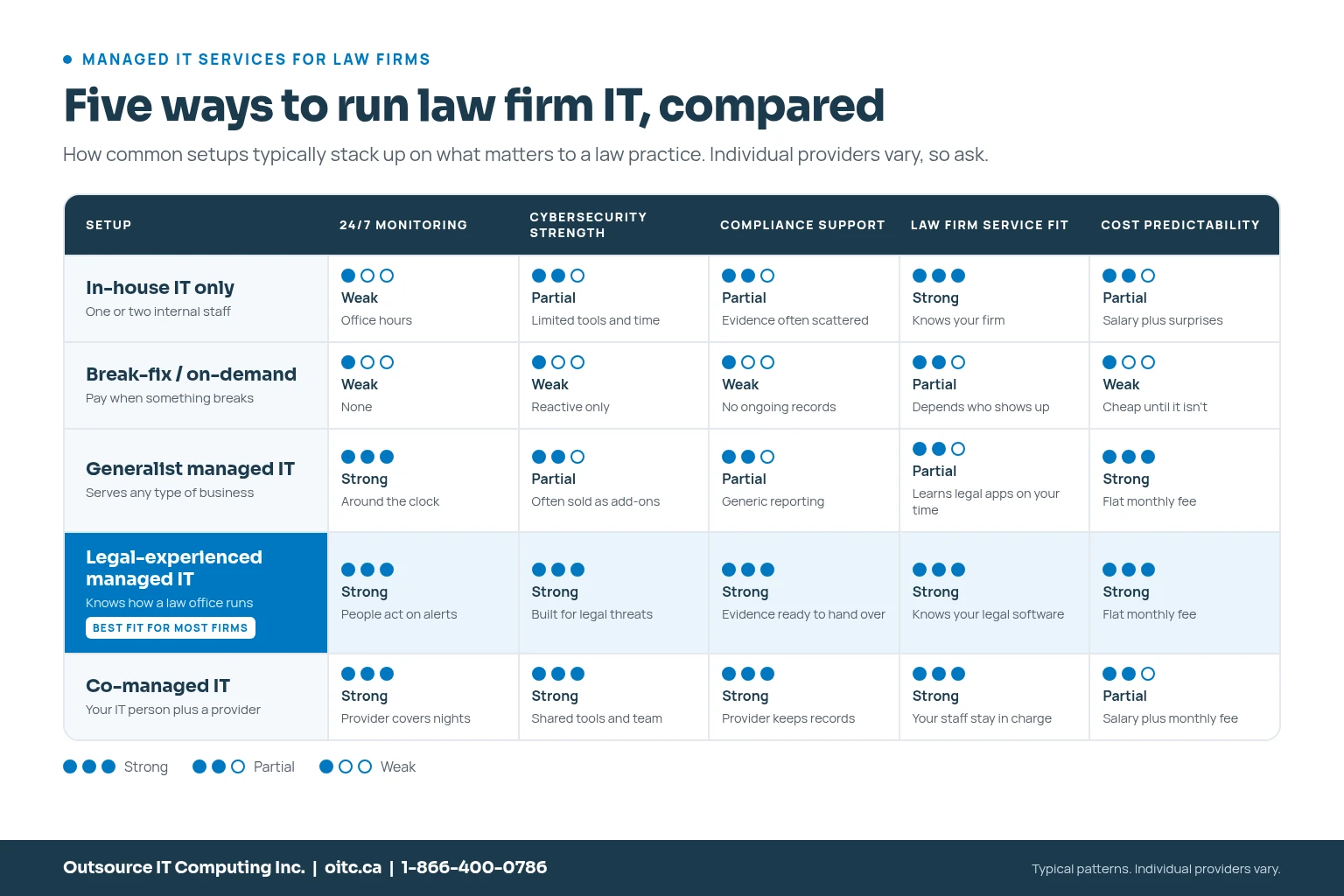
Here's how the five common setups usually stack up. Individual providers vary, so treat this as a starting point, not a verdict.
- In-house IT only: knows your firm well, but one or two people can't cover nights, vacations and specialist security. Works best for larger firms that also add outside monitoring.
- Break-fix or on-demand IT: you pay when something breaks. Cheap until it isn't. No monitoring, little security and no compliance evidence.
- Generalist managed IT provider: solid monitoring and support, but may not know your legal software, your closing days or what LawPRO expects.
- Legal-experienced managed IT provider: 24/7 monitoring, managed cybersecurity and compliance support from people who already know how a law office runs. The best fit for most small and mid-sized firms.
- Co-managed IT: keeps your internal IT person in charge and adds monitoring, security and after-hours coverage. Best for firms that already have good IT staff.
How the October attacks worked, and what stops them
If you want one example of why the security piece matters, this is it. Here's the attack chain the Cyber Centre described, step by step, with the control that breaks each link.
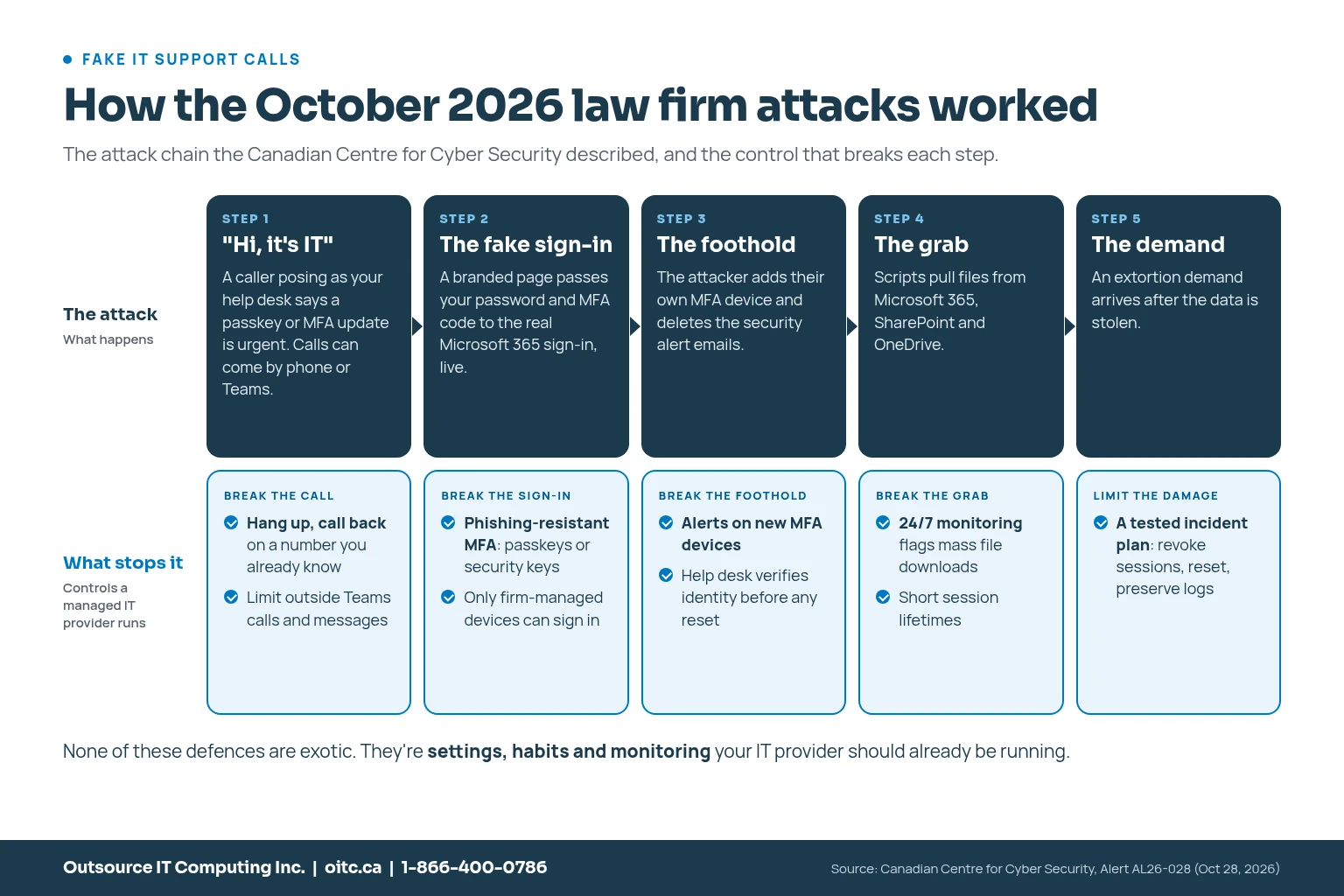
None of these defences are exotic. They're settings, habits and monitoring. That's exactly what a good managed IT provider should already be doing for you.
How much do managed IT services cost for a law firm?
In Ontario, fully managed plans commonly fall between about $130 and $250 per user per month, and co-managed plans between about $80 and $150, depending on what's included.
Don't compare on price alone. Compare what's in the box: 24/7 monitoring, security tools, backups, after-hours response, onboarding and compliance reporting. A cheap plan that sells security as extras usually costs more by the end of the year.
10 questions to ask before you sign
Print this. Score each provider from 1 to 5 on every question. The right choice usually becomes obvious.
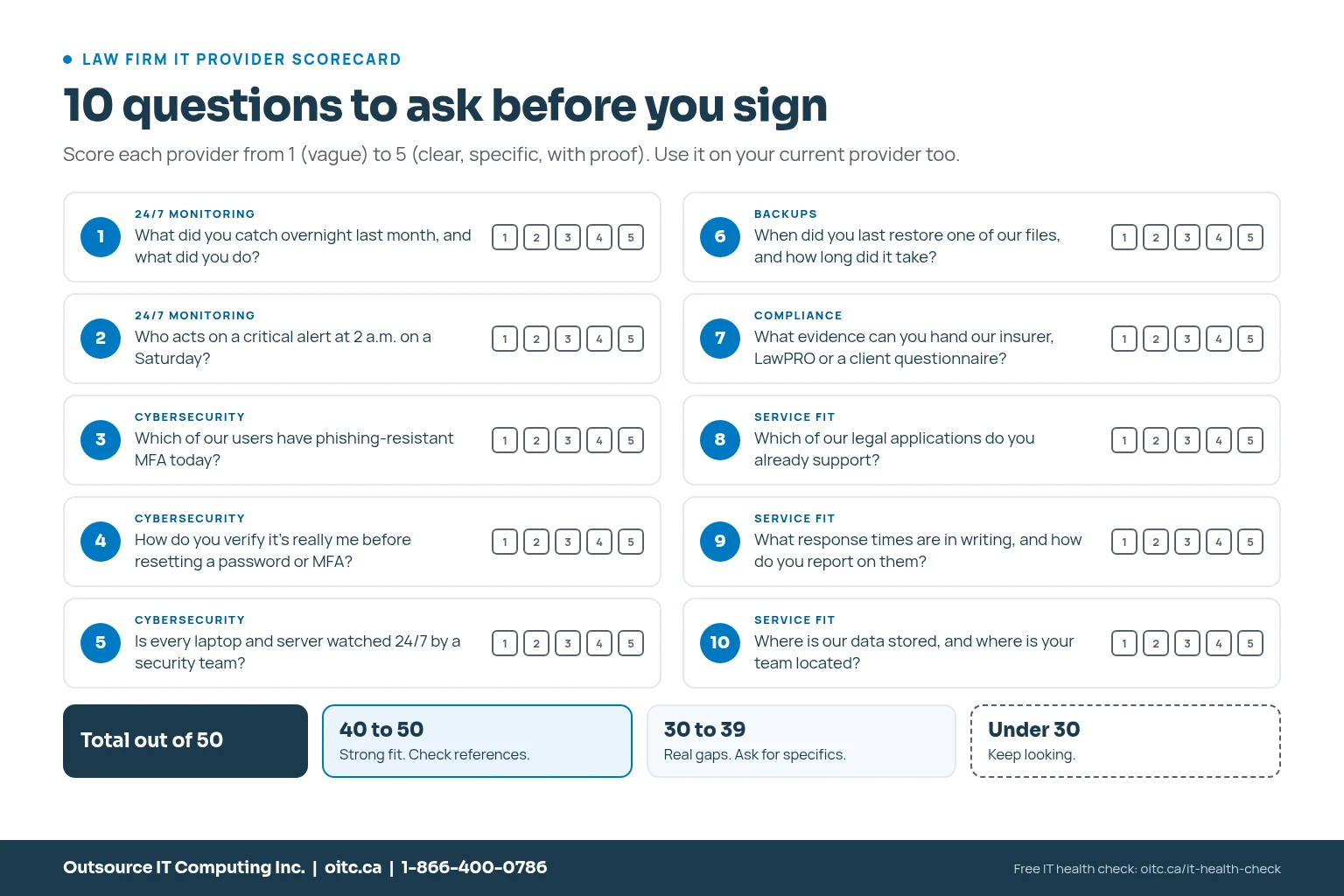
You can also run any provider, including your current one, through our free MSP scorecard.
How Outsource IT supports law firms
I'll keep this short, because every question above applies to us too.
- We've supported Ontario legal practices for more than 12 years. We're a TLOMA business partner and a technology partner of the Ontario Trial Lawyers Association.
- Our team already works with legal applications like PCLaw, Clio, Teraview, The Conveyancer and DivorceMate.
- We provide managed IT services with 24/7 monitoring, managed cybersecurity services with round-the-clock threat detection, and IT compliance support.
- If you already have IT staff, our co-managed IT fills the gaps without taking over.
- Our team is here in Canada.
See how we work with law practices on our IT for legal and professional services page, or read five reasons law firms outsource IT.
What to do this week
- Tell every staff member: if "IT" calls asking you to sign in, reset MFA or set up a passkey, hang up and call back on a number you already know.
- Ask your IT provider which users have phishing-resistant MFA today, starting with partners and accounting staff.
- Review who has admin access to Microsoft 365 and your practice management system.
- Talk to your bank about dual approval and alerts for trust account wires.
- Confirm you've taken LawPRO's steps to extend your social engineering coverage.
- Restore one real file from backup, and time how long it takes.
Frequently asked questions
What are managed IT services for law firms?
Managed IT services for law firms are ongoing IT support, 24/7 monitoring, cybersecurity and compliance help from an outside provider for a predictable monthly fee, set up around legal software, client confidentiality and trust account risks.
Do small law firms need 24/7 IT monitoring?
Yes. Fraud and failures don't keep office hours. LawPRO has described unauthorized transfers from a firm's accounts that happened over a weekend and weren't discovered until Monday morning.
What should a law firm look for in a managed IT provider?
Real 24/7 monitoring, managed cybersecurity services including phishing-resistant MFA and endpoint detection, IT compliance support that produces evidence, experience with legal software, written response times and a Canadian team.
How much do managed IT services cost for a law firm in Ontario?
Fully managed plans commonly range from about $130 to $250 per user per month, and co-managed plans from about $80 to $150, depending on what's included.
Does the Law Society of Ontario expect lawyers to understand technology?
Yes. The commentary to the Law Society of Ontario's competence rule says lawyers should understand the benefits and risks of technology relevant to their practice, including its effect on client confidentiality.
What is the difference between managed IT and co-managed IT for a law firm?
With fully managed IT, the provider runs all of your IT. With co-managed IT, your internal IT person stays in charge and the provider adds monitoring, security and after-hours coverage.
How do I protect my firm from fake IT support calls?
Use phishing-resistant MFA, make sure your help desk verifies identity before any reset, limit outside Teams calls and messages, and train staff to hang up and call back on a known number whenever someone claiming to be IT asks them to sign in or change MFA.
Next steps
If you're comparing providers, or you're not sure how your current setup stacks up, we're happy to take an honest look. Book a free IT health check, contact our team, or call 1-866-400-0786.
Jerry
Sources
- Canadian Centre for Cyber Security: Alert AL26-028, Ongoing help desk voice phishing campaign targeting Canadian organizations (Oct 28, 2026)
- McCarthy Tétrault: Statement on cybersecurity incident (Oct 29, 2026)
- Bennett Jones: Notice of data security incident (Oct 28, 2026)
- Borden Ladner Gervais: Statement (Oct 2026)
- LAWPRO practicePRO: Watch for unauthorized wire transfers from your trust account (June 2026)
- LAWPRO practicePRO: Social Engineering Toolkit
- Office of the Privacy Commissioner of Canada: What you need to know about mandatory reporting of breaches of security safeguards
- Law Society of Ontario: Rules of Professional Conduct, Chapter 3
- TLOMA: Business partner directory, Outsource IT Computing
About the author
Jerry Aaron, Systems Administrator
Written and reviewed by the Outsource IT team, a Burlington, Ontario managed IT services provider supporting businesses across the GTA for over 20 years. Meet the team.
Want this handled for you?
Outsource IT keeps Ontario businesses secure, supported and running. Book a short call, or score your current setup with our free IT Health Check.